
Google Sheets and Excel Kanban Board Template
🎯 Best Value: This template + 30 more
Get this plus 30+ Project Management templates for just $99.
Get the Project Management Bundle — $99— OR continue with just this template below —
What's Inside the Kanban Board Template?
Details | 5 Sheets
Supported Versions (All Features) | Excel 2013, 2016, 2019, Office 365 (Mac)
Supported Versions (Significant Features) | Excel 2010, 2013, 2016, 2019, Office 365 (Mac), Google Sheets
Category | Project Management
Tags | Agile, Notetaking, Scrum

Why Professionals Choose Simple Sheets
It's simple. Access to the largest library of premium Excel Templates, plus world-class training.

100+ Professional Excel Templates
Optimized for use with Excel. Solve Excel problems in minutes, not hours.

World-Class Excel University
With our university, you'll learn how we make templates & how to make your own.

How-To Videos
Each template comes with a guide to use it along with how-to videos that show how it works.
Inside Our Kanban Board
Excel & Google Sheets Template
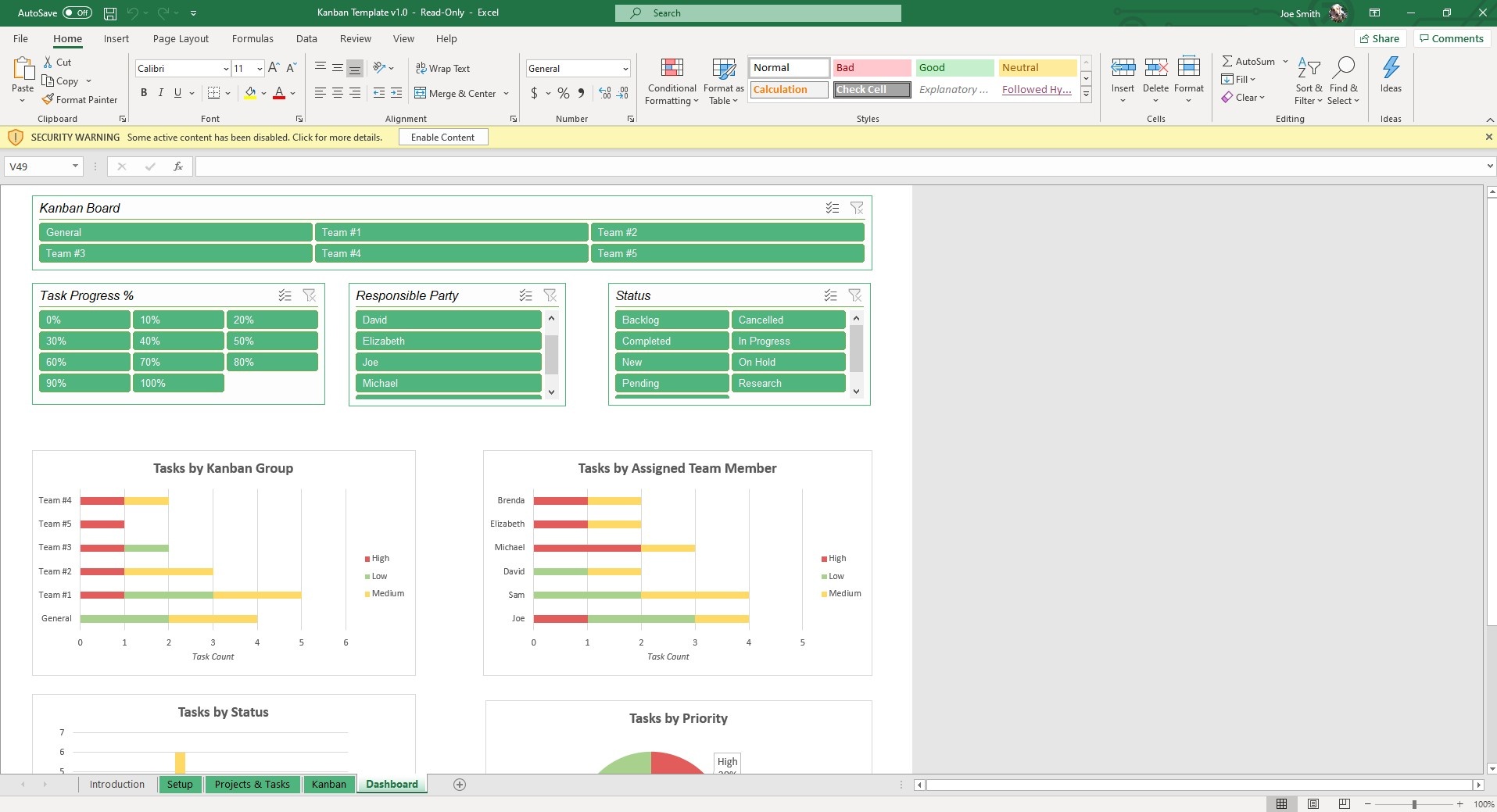
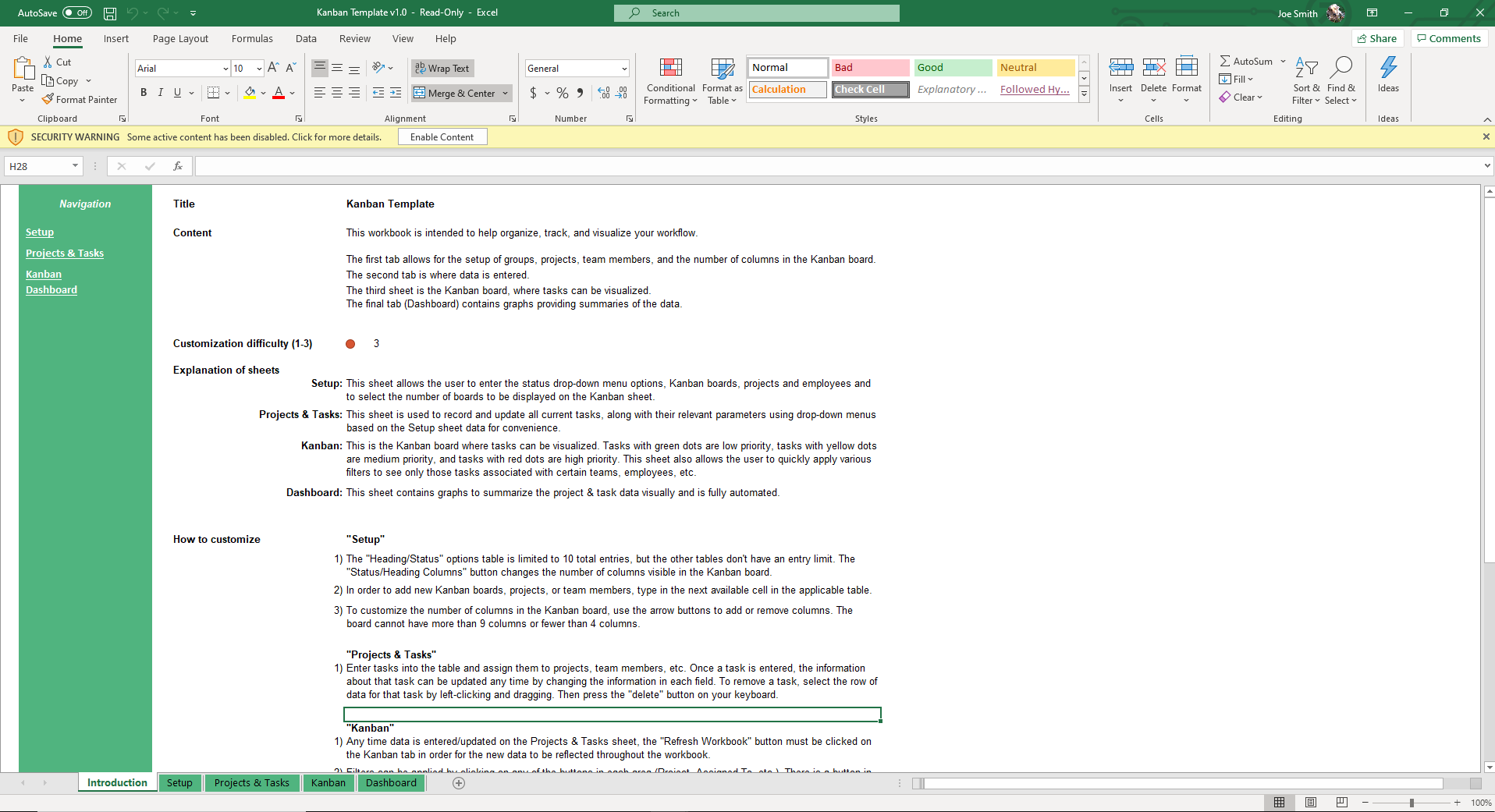
Bring order to your projects and tasks with this Kanban board template. Instead of juggling messy to-do lists, you get a visual board that shows exactly what is pending, in progress, and completed. This makes it easier to assign responsibilities and keep your team focused on priorities.
Since it’s built as a Kanban Excel template, you can customize it to match your workflow and update it as your projects evolve. It also works as a Kanban board Google Sheets template for smooth collaboration and accessibility.
What Is a Kanban Board?
A Kanban board is a visual tool for managing work by displaying tasks as they progress through stages of a process. A card represents each task, and the cards are organized into columns such as Research, To-Do, In Progress, and Completed. This simple system enables teams to visualize progress and reduce bottlenecks.
Originally developed in lean manufacturing, Kanban is now widely used in project management, software development, and everyday team planning. Use our Kanban template Excel or Google Sheets to bring this proven method into your projects without the need for complex software.
Why Use an Excel Kanban Board Template?
When you manage projects without a clear system, it can lead to confusion and missed deadlines. A Kanban chart template enables you to work professionally and efficiently.
- Time-saving: It eliminates the need for learning how to create a kanban board in excel
- Improve visibility: See the exact stage various tasks are in.
- Adapt to your needs: Customize the categories and task details to fit your workflow.
- Make better decisions: Built-in charts and filters help highlight bottlenecks and priorities.
- Collaborate easily: You can use it to work with your team in either Excel or Google Sheets in real-time.
Features of the Excel Kanban Board Template
The Kanban board template Excel is a complete project management system. Here are some of its best features.
- Track up to 100 projects: Handle multiple projects in one file without losing clarity.
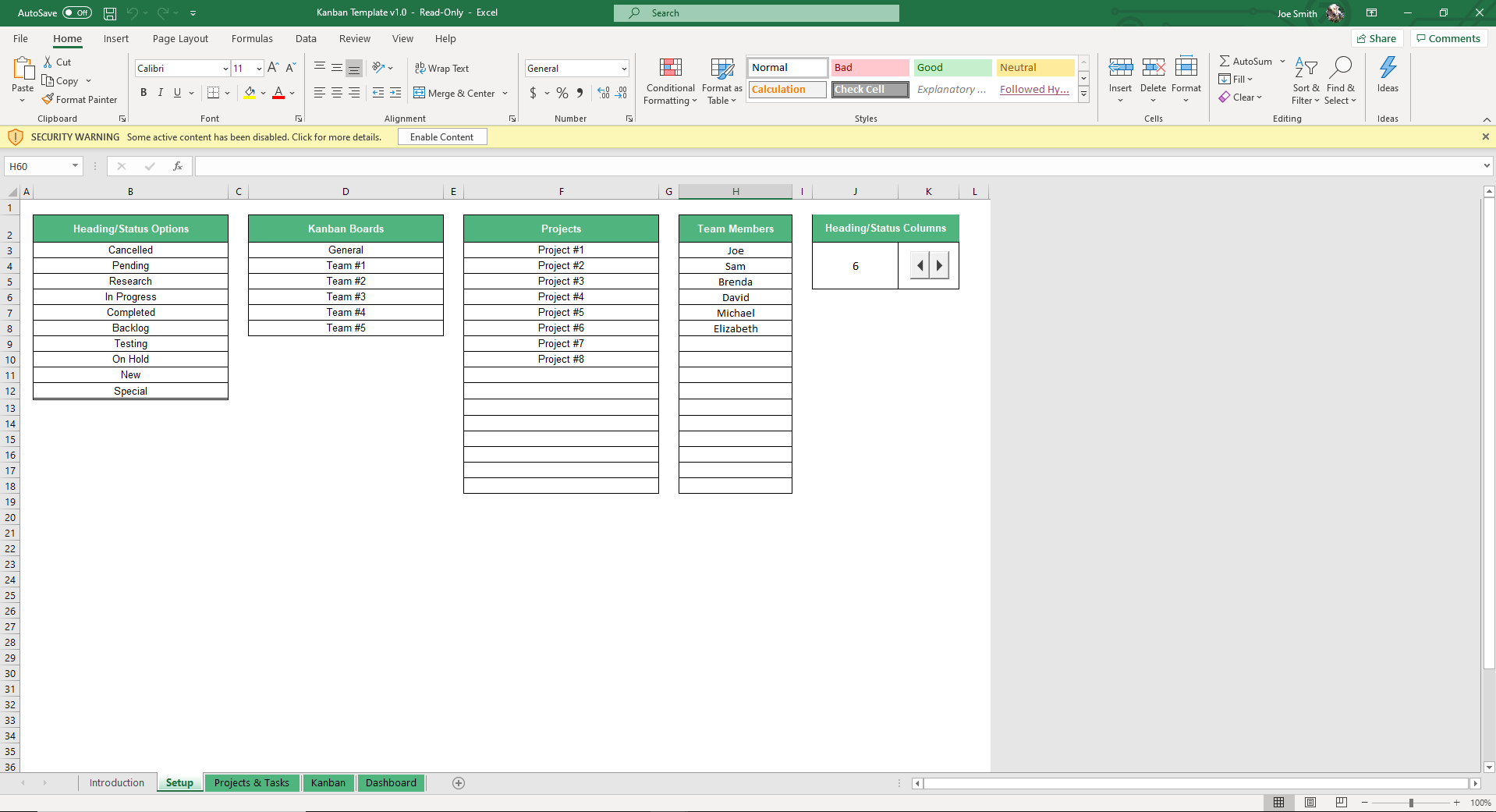
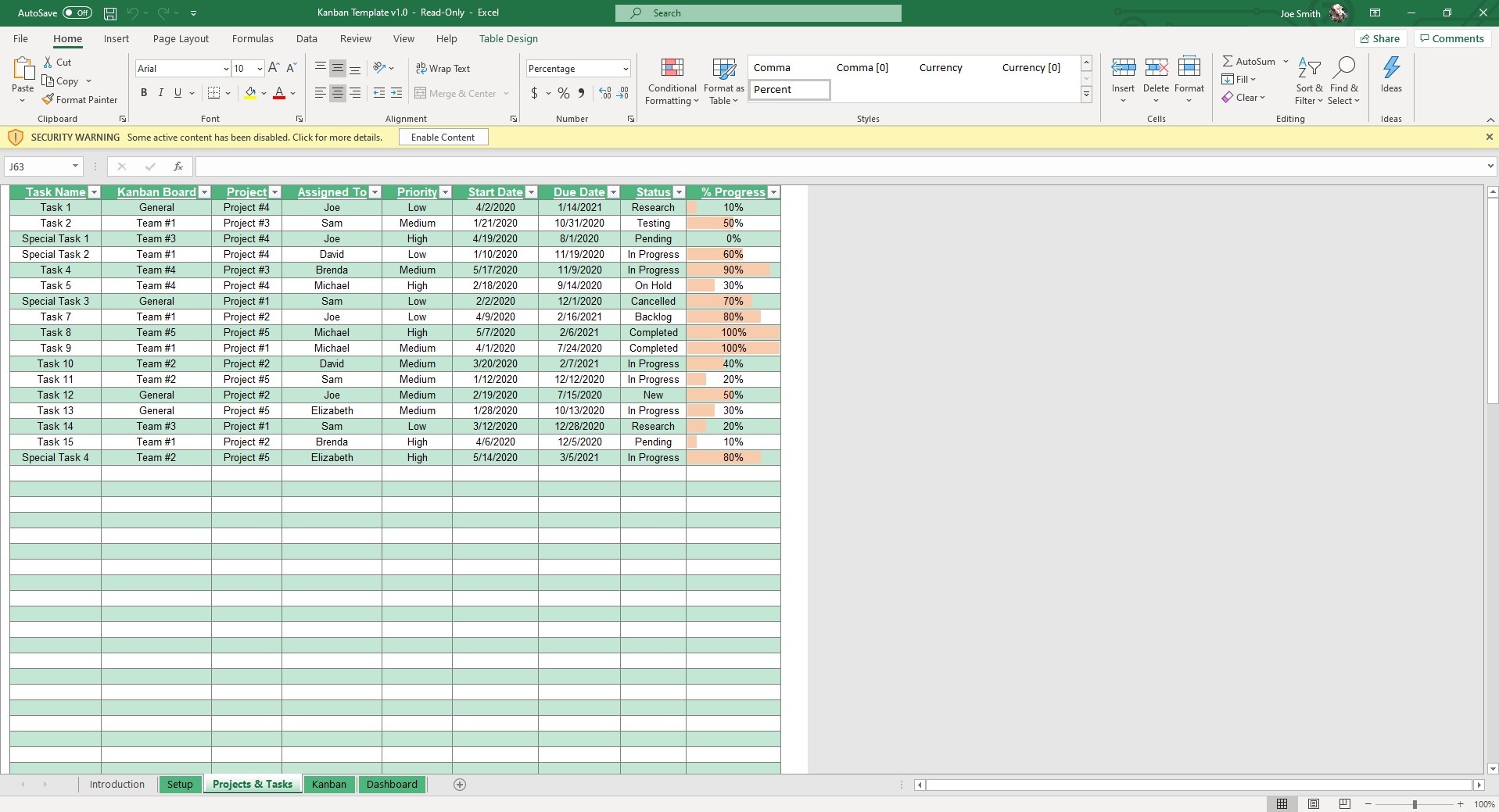
- Editable dropdowns: Customize categories such as project name, team member, and task status directly in the Setup sheet.
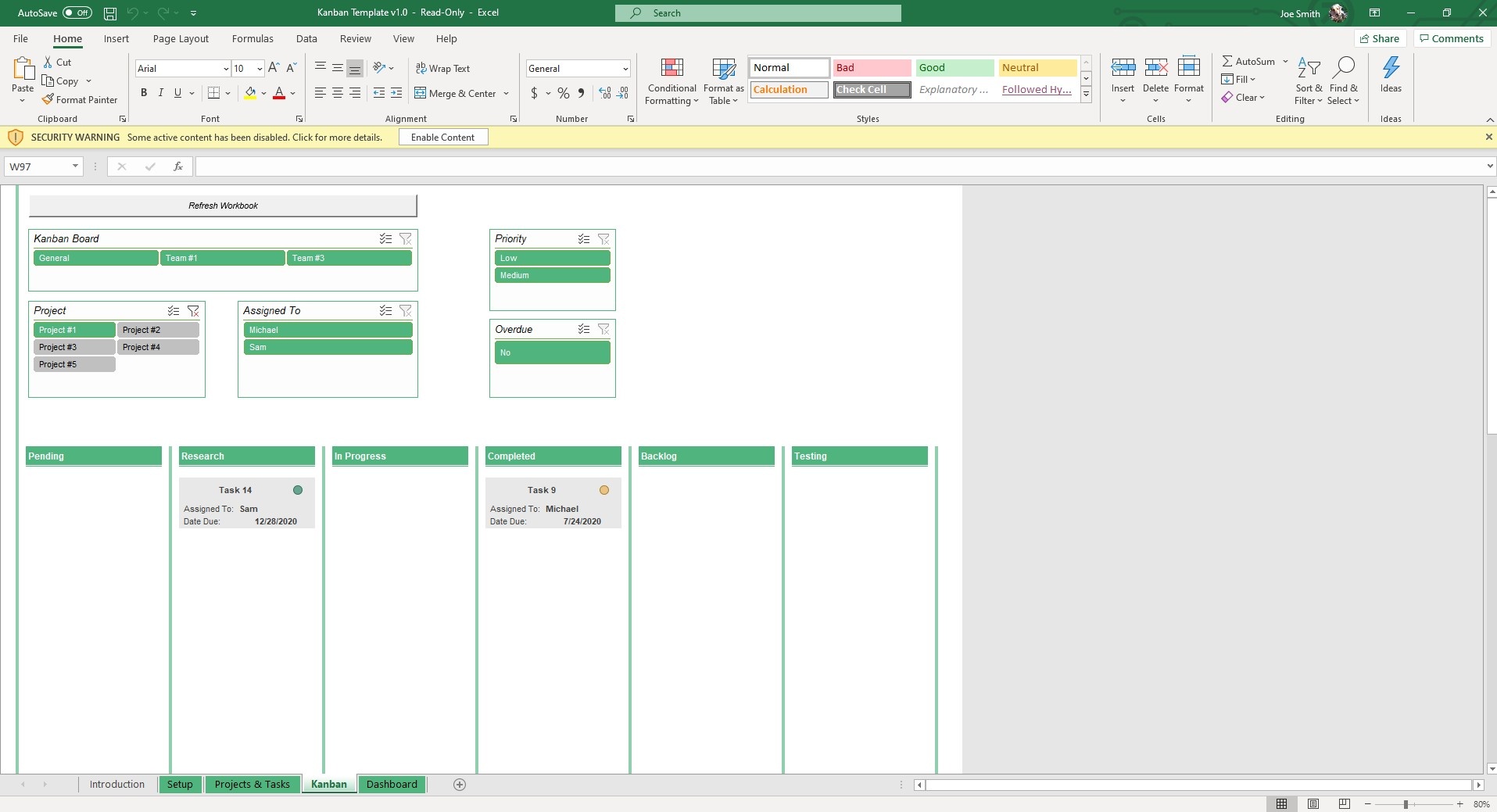
- Dynamic Kanban board: Tasks move across columns like In Progress, Testing, Pending, and Completed based on the status you assign.
- Built-in filters: Instantly filter tasks by project, assignee, priority, or status for a focused view.
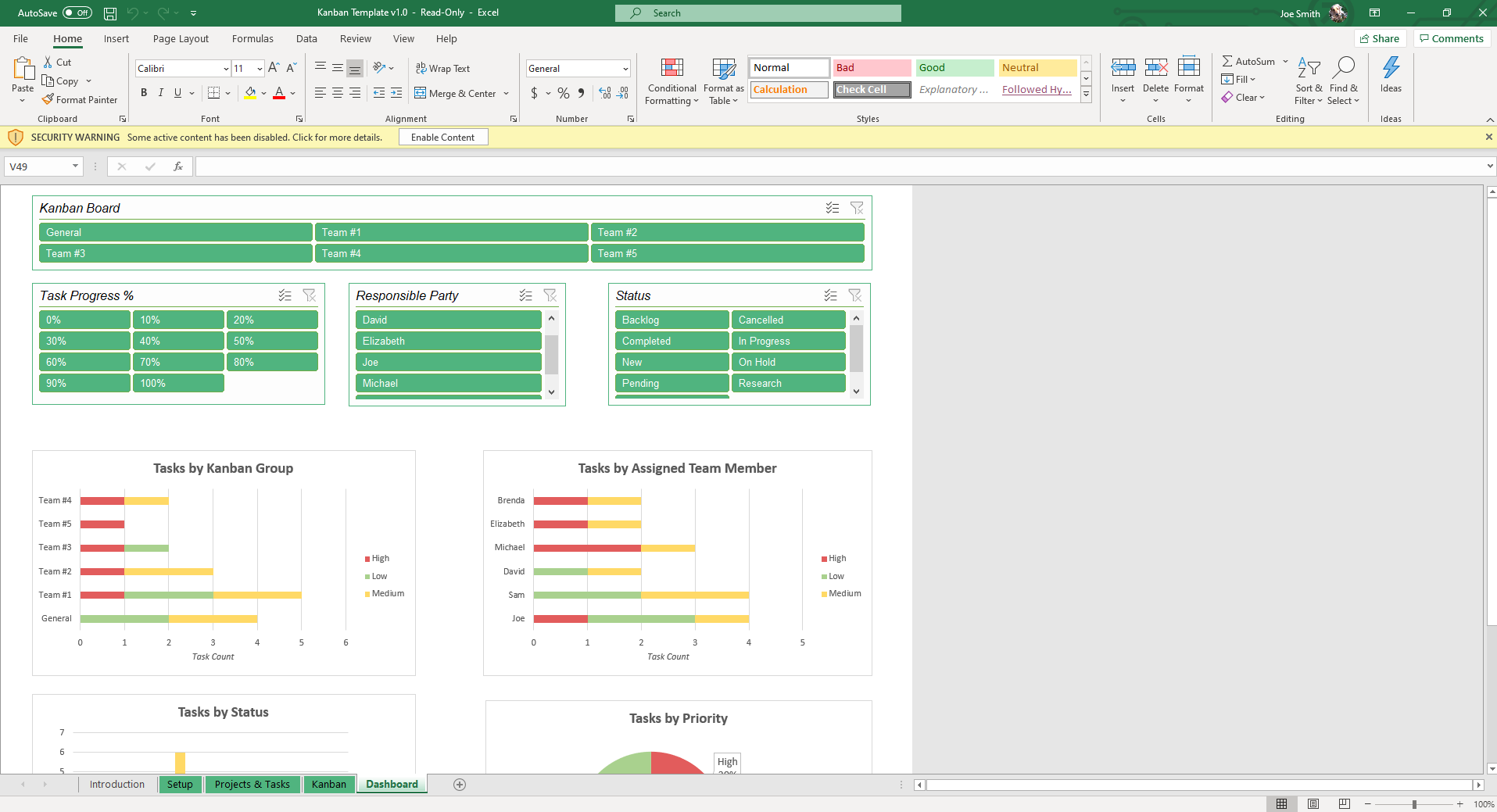
- Automated dashboard: View charts that summarize tasks by project, department, status, or priority.
How to Use the Excel Kanban Board Template
This Excel & Google Sheets Kanban board template helps you jump right into project tracking. Follow the steps below to have a seamless experience using it:
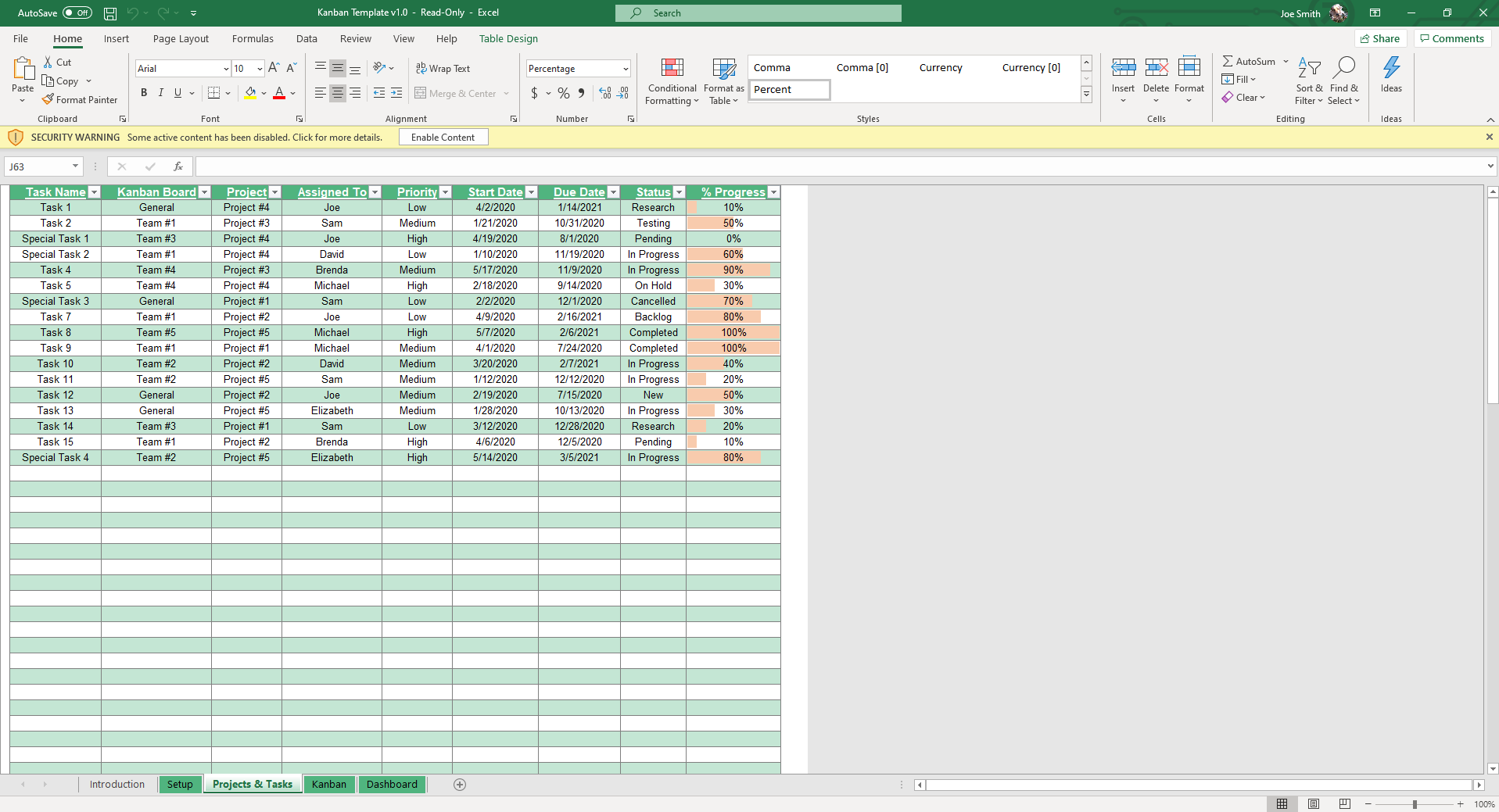
- Start in the Projects & Tasks sheet: Enter each task with details such as project name, description, assignee, status, priority, and due date. Be sure to fill in all fields so your board and charts update correctly.
- Customize dropdowns in the Setup sheet: Edit project, team member, and task status categories. You can also add or remove Kanban columns with the arrow buttons to match your process.
- View your Kanban board: Go to the Kanban Board sheet to see tasks displayed as cards across workflow stages. Update a task’s status, and it will move to the right column automatically.
- Apply filters: Narrow down tasks by project, assignee, status, or priority for a focused view. Clear filters easily with the built-in red X button.
- Check the dashboard: Use the Dashboard sheet to track progress visually. Charts summarize tasks by project, department, priority, and completion status.
- Use special buttons: Press the Refresh button to update charts and the board, or switch to full-screen mode for a distraction-free workspace.
Who Is the Excel Kanban Board Template for?
Anyone who needs a simplified Kanban system will find this Kanban Excel template useful. It is simple enough for users with minimal spreadsheet experience.
- Project managers: Assign tasks and keep deadlines visible.
- Teams: Improve collaboration by managing shared workflows in Excel or Google Sheets.
- Freelancers: Organize client projects and deliverables in one file.
- Product managers: Use it as a Kanban card template Excel to map out features, fixes, and release cycles.
- Educators and students: Use it as a Kanban chart template to manage research and team assignments.
Get the Kanban Board Excel Template
Get more done with a system that makes work visible and manageable. This Excel Kanban board template is easy to set up, customize, and share with your team. It is also compatible with both Excel and Google Sheets. Get it now to get the best offer.
More Templates Like This
Seeking alternative methods to manage projects? We offer a range of tools designed to simplify workflows and enhance team productivity.
Flow Chart Template
Map out processes step by step with our flow chart template Excel. It’s an easy way to visualize decisions and track outcomes.
Weekly Team Meeting Template
Keep your meetings focused and productive with the weekly team meeting template. Record agendas, track action items, and follow up on progress in a structured format.
Gap Analysis Template
Use the gap analysis template to compare your current performance with future goals. It highlights areas for improvement and helps you create a clear plan of action.
FAQ
1. Can this template be used in Google Sheets?
You can use it as a Google Sheets Kanban board template. This makes it easy to share and collaborate with your team online.
2. How do I create a Kanban board in Excel using this template?
You don’t need to build one from scratch. Simply enter tasks into the Projects & Tasks sheet and assign statuses. The Kanban board Excel template updates automatically.
3. Can I customize the workflow stages?
The Kanban chart template features editable dropdowns and arrow buttons, allowing you to adjust columns and categories as needed.
More Project Management Templates For You


