
Gantt Chart
Excel Template
🎯 Best Value: This template + 30 more
Get this plus 30+ Project Management templates for just $99.
Get the Project Management Bundle — $99— OR continue with just this template below —
What's Inside the Gantt Chart Template?
Details | 2 Sheets
Supported Versions | Excel 2010, 2013, 2016, 2019, Office 365 (Mac)
Category | Project Management
Tags | Bar Charts
Why Professionals Choose Simple Sheets
It's simple. Access to the largest library of premium Excel Templates, plus world-class training.

100+ Professional Excel Templates
Optimized for use with Excel. Solve Excel problems in minutes, not hours.

World-Class Excel University
With our university, you'll learn how we make templates & how to make your own.

How-To Videos
Each template comes with a guide to use it along with how-to videos that show how it works.
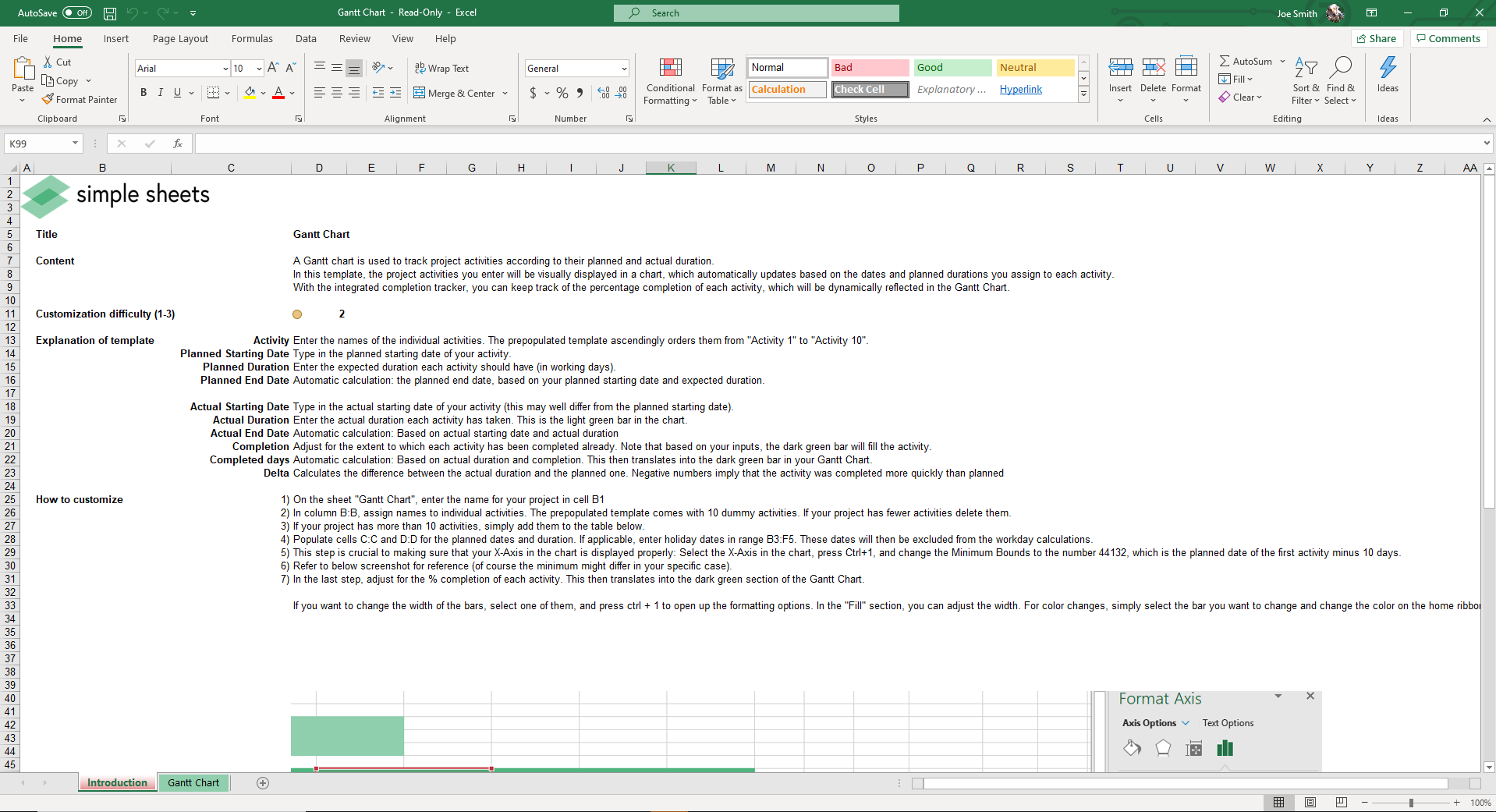
Inside Our Gantt Chart Excel Template
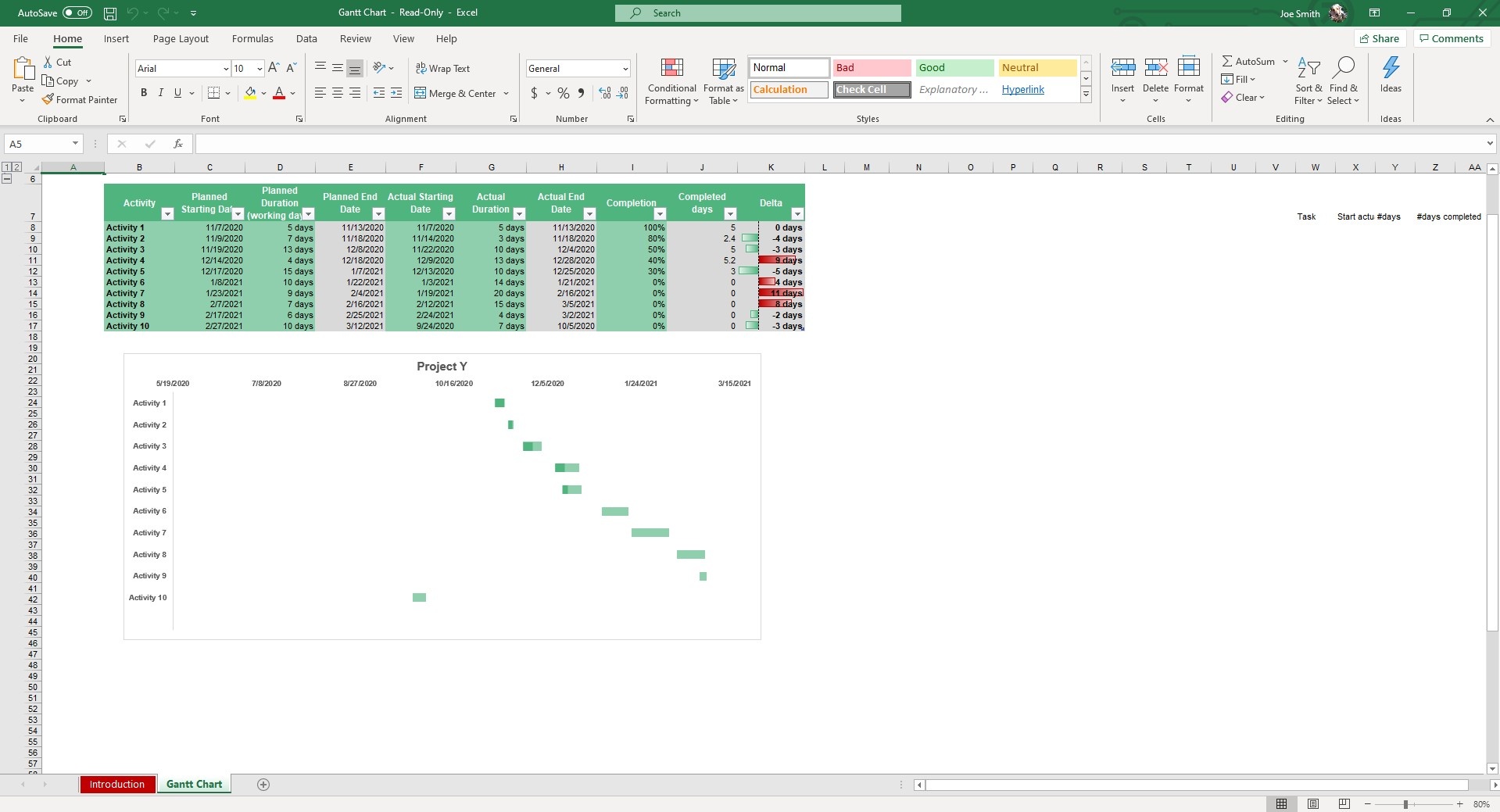
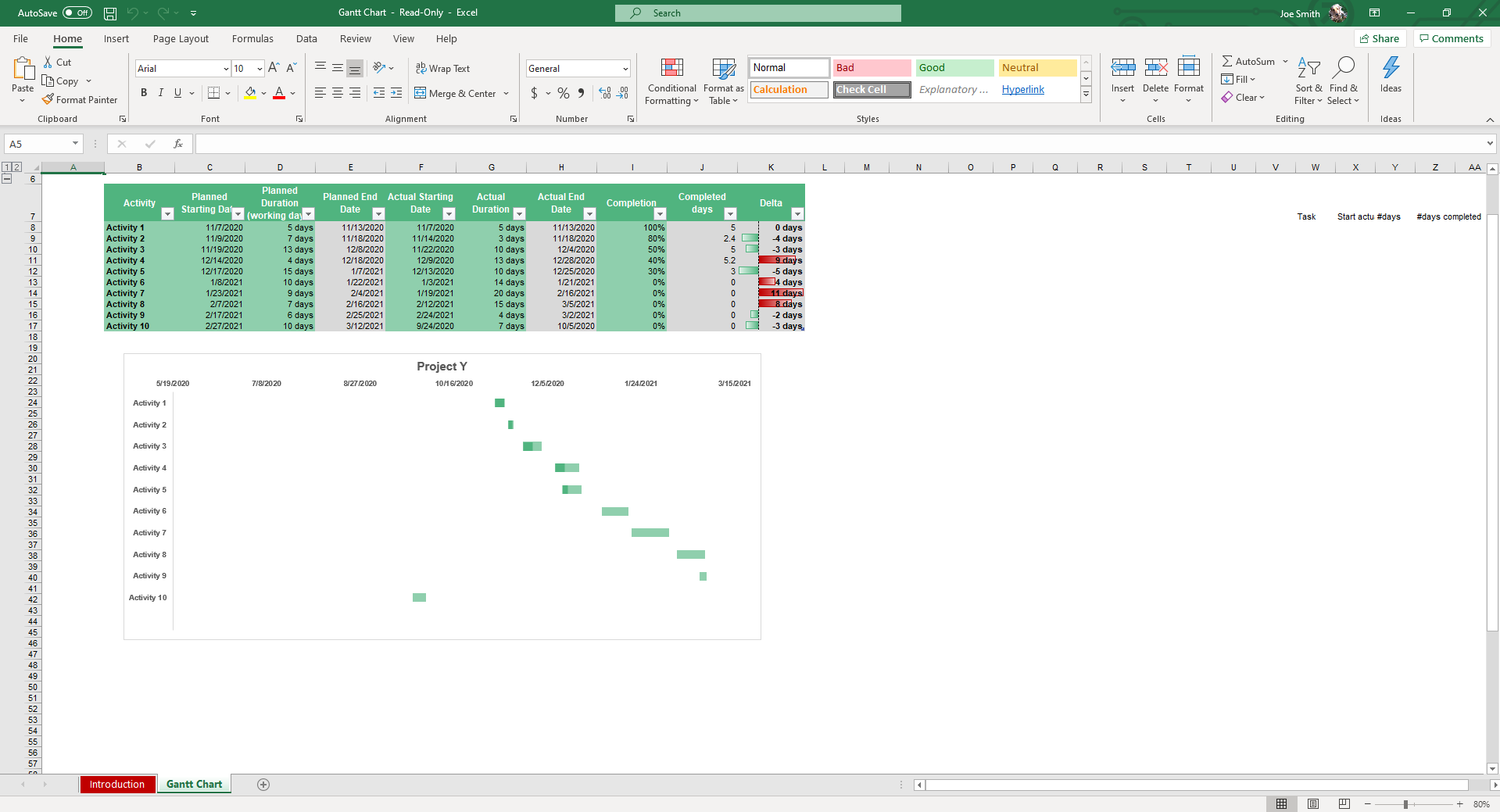
Project management doesn’t need to be complicated. With our simple Gantt chart template Excel, you can quickly map out tasks and see your entire project timeline in one view. Everything works smoothly, and the chart updates automatically as you fill in your details.
This template works seamlessly as both a simple Excel Gantt chart template and a Google Sheets Gantt template. So, you get the flexibility to manage projects anywhere. Whether you’re working on marketing campaigns or product launches, this is the simplest way to keep projects organized and on schedule.
What Is a Gantt Chart?
A Gantt chart is a project management tool that shows tasks on a timeline. It represents each task with a bar that shows the start date, duration, and end date.
This simple layout makes it easy to track progress and adjust plans when delays happen. Gantt charts are widely used across industries because they turn complex project schedules into clear visuals that everyone can understand.
Why Use Our Simple Gantt Chart Template Excel?
Building a Gantt chart from scratch can be slow, and even small mistakes can disrupt a project schedule. Our simple Gantt chart template for Excel and Google Sheets gives you a ready-made structure that makes project tracking easier.
- Save time with automation: Dates and task durations are handled with built-in formulas.
- Track progress accurately: Planned and actual schedules are displayed side by side, allowing you to identify delays or overruns as soon as they occur.
- Stay organized: The chart clearly displays each task on the timeline so that you can see dependencies, overlaps, and critical dates at a glance.
- Minimize mistakes: Built-in logic reduces manual errors and keeps your project data consistent from start to finish.
Features of the Simple Gantt Chart Template Excel
Our Excel and Google Sheet Gantt template gives you a complete project-tracking system built directly into a spreadsheet. Here are some of its best features:
- Automatic progress calculation: See completed days, remaining days, and percentage complete updated in real time.
- Dynamic chart updates: As you adjust dates or durations, the template Gantt chart refreshes automatically to reflect changes.
- Clear task visualization: Each activity is displayed in a timeline format. This makes overlaps and dependencies easy to see.
- Easy to use: You don’t need advanced Excel knowledge. The layout is simple, with ready-to-fill fields in for quick setup.
- Adaptable: Our Excel simple Gantt chart template is suitable for use across industries and team sizes. You can use it for planning marketing campaigns, construction projects, product launches, or daily operations.
How to Use the Simple Gantt Chart Excel Template
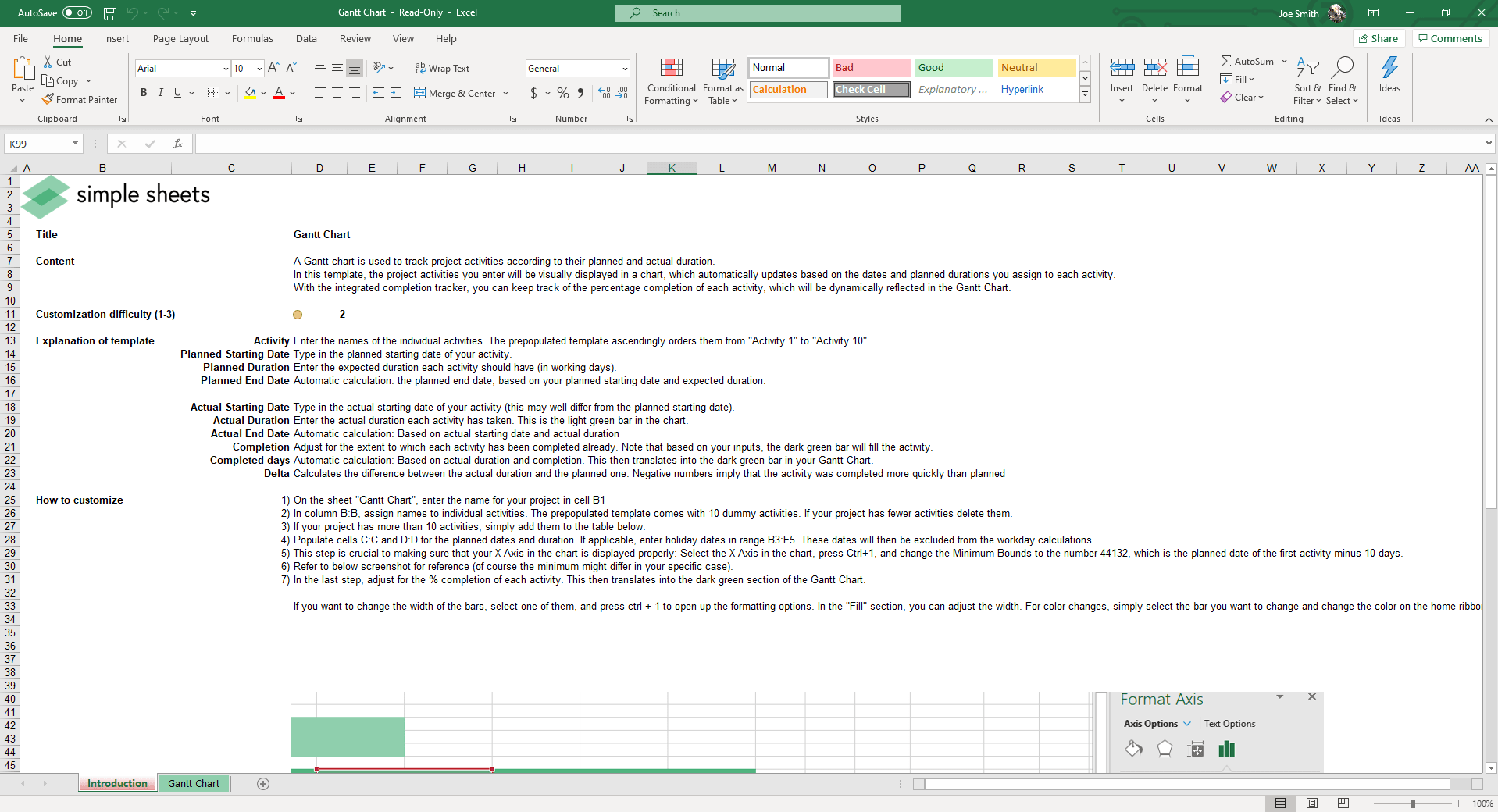
Our Gantt chart template for Google Sheets and Excel is preloaded with example activities and built-in formulas that update your chart automatically as you enter your project details. Learn how to use it below:
- Add your activities: Enter the task names in the activity column. You can use the preloaded placeholders or replace them with your own project tasks.
- Set planned dates: Type in the planned start date and the expected duration (in working days). This Gantt template Google Sheets will calculate the planned end date automatically.
- Enter actual dates: Add the actual start date and actual duration. Based on these values, the chart updates to show the real timeline compared to the plan.
- Track progress: The template Gantt chart calculates completion percentages, completed days, and the delta (difference between planned and actual). Negative values in the delta column show tasks completed ahead of schedule.
- Review your chart: The Gantt chart dynamically updates as you add or adjust data. This gives you a live visual of your project’s progress.
Who Is the Simple Gantt Chart Template Excel for?
This Gantt chart template for Google Sheets and Excel is made for anyone who wants to manage a project visually without complicated software.
- Project managers who want to keep teams on schedule.
- Business owners who need a simple way to organize campaigns or operations.
- Team leads who want to assign tasks, monitor progress, and report updates with ease.
- Students and educators managing group projects or academic timelines.
- Freelancers and consultants who need to present project schedules to clients.
Get the Simple Gantt Chart Template Excel
Stop wasting time building project trackers from scratch. Get our simple Gantt chart template Excel & Google Sheets to start planning and monitoring tasks in minutes. Enter your activities and let the chart update automatically as your project moves forward. Download today and take control of your project timelines with ease.
About Simple Sheets
Every templatefrom Simple Sheets is built to save time and give you clear insights into your work. Our customer support team is here to guide you so you can get the most out of your tools. For your project management needs, we offer more tools like the 12-week year planner, burndown chart, and Kanban template.
Pair with: project task list template — manage day-to-day work items behind your timeline.
FAQ
1. Can I use the simple Gantt chart template Excel in any version of Excel?
The Gantt chart excel template simple works with all modern versions of Excel, including Office 365.
2. Can I use it for Google Sheets as well?
We also offer a Gantt chart template for Google Sheets, so that you can manage projects online with your team.
3. Is support included if I need help?
Every download includes access to customer support from Simple Sheets. You will get assistance whenever you need it.
Gantt Chart vs Project Timeline vs Roadmap
When planning a new initiative, it is easy to confuse the various tracking tools available. While they share similarities, a Gantt chart, a project timeline, and a project roadmap serve distinctly different purposes depending on your audience and the level of detail required.
Understanding these differences ensures you choose the right tool for the job:
- Gantt Chart: This is a highly detailed, tactical tool used by project managers and execution teams. It displays individual tasks as horizontal bars over time, clearly showing start/end dates, task durations, and dependencies. If you need to know exactly what a specific team member is doing next Tuesday, this is the tool to use.
- Project Timeline: A project timeline template provides a linear, high-level overview of a project. Instead of showing task durations with horizontal bars, an excel timeline template typically highlights major milestones, deadlines, and deliverables along a single horizontal line. It is excellent for quickly showing clients when major phases will be completed without bogging them down in daily task details.
- Project Roadmap: A roadmap is a strategic document used primarily by executives and product managers. It outlines the overarching vision, major initiatives, and long-term goals over a quarter or a year. It rarely includes specific dates or granular tasks.
If your goal is to actively manage resources, track daily progress, and adjust schedules when minor delays occur, a robust project timeline template excel built in a Gantt format is your best option. It provides the tactical depth that simple timelines and broad roadmaps lack.
When to Use a Gantt Chart (and When Not To)
While gantt chart templates are a staple of project management, they are not the perfect solution for every single workflow. Understanding gantt chart uses helps you avoid forcing a rigid structure onto a project that requires flexibility.
You should absolutely use a Gantt chart when your project follows a waterfall methodology. They excel in scenarios with strict sequences, firm deadlines, and clear dependencies—where Task B literally cannot begin until Task A is finished. Typical examples include event planning, product manufacturing, and construction. In these cases, seeing the overlapping timelines prevents costly scheduling conflicts.
However, you should reconsider using a Gantt chart for highly agile projects with rapidly changing scopes, such as early-stage software development or open-ended creative retainers. If your task lists change daily, constantly updating the dates and dependencies in a Gantt chart will become a frustrating administrative burden. Additionally, if your project consists of hundreds of tiny, disconnected tasks, a visual timeline might become cluttered and unreadable. In those highly fluid scenarios, a simpler project task list or a Kanban board might be more appropriate.
Construction & Marketing Gantt Chart Examples
To understand the versatility of a project schedule template, it helps to look at practical, industry-specific applications. Because the template is entirely customizable, it adapts easily to wildly different workflows.
The Construction Gantt Chart
A construction gantt chart is critical because physical building phases are strictly sequential. A general contractor might set up the chart with major phases: Site Prep, Foundation, Framing, Plumbing/Electrical, and Finishing. Under "Foundation," they will list tasks like excavating, pouring concrete, and curing. Because the framing team cannot start until the concrete is fully cured, the dependencies are rigid. If the concrete pour is delayed by three days due to rain, the contractor can adjust the duration in the spreadsheet, instantly shifting the framing timeline and allowing them to accurately update their sub-contractors and overall budget.
The Marketing Gantt Chart
Conversely, a marketing gantt chart often deals with parallel, overlapping workflows. Imagine a team launching a new product. The chart would track multiple disciplines at once: the copywriters drafting landing pages, the design team creating ad assets, and the technical team setting up the email automation. While these tasks happen simultaneously, they all converge on a single, strict launch date. The marketing manager uses the chart to ensure the designers finish their assets exactly when the media buyers need to traffic the ads. If external materials are needed, this process might even tie into a purchase order management workflow to ensure vendors are paid before launch.
More Project Management Templates For You


